
Overview
WEBcnx 2025.1 focuses on admin productivity, configuration flexibility, and platform modernisation. Key highlights include a redesigned and clientised Database Window Designer, new Excel-style text functions for expressions, Python support for value mappings, and more precise control over custom action visibility for designs by layer type. The release also includes smaller usability enhancements for both site administrators and end-users, including additional email notifications options, mobile-site improvements, whilst addressing a wide range of customer reported bug fixes and minor enhancements.
Database Window (DBW) Designer Enhancements
Following in the footsteps of the New Task Type Designer introduced in WEBcnx 2024.1, the Database Window (DBW) Designer has also now been brought into the modern client-based administration experience. These enhancements make designing Database Windows faster and more intuitive, with a cleaner interface and simpler controls.
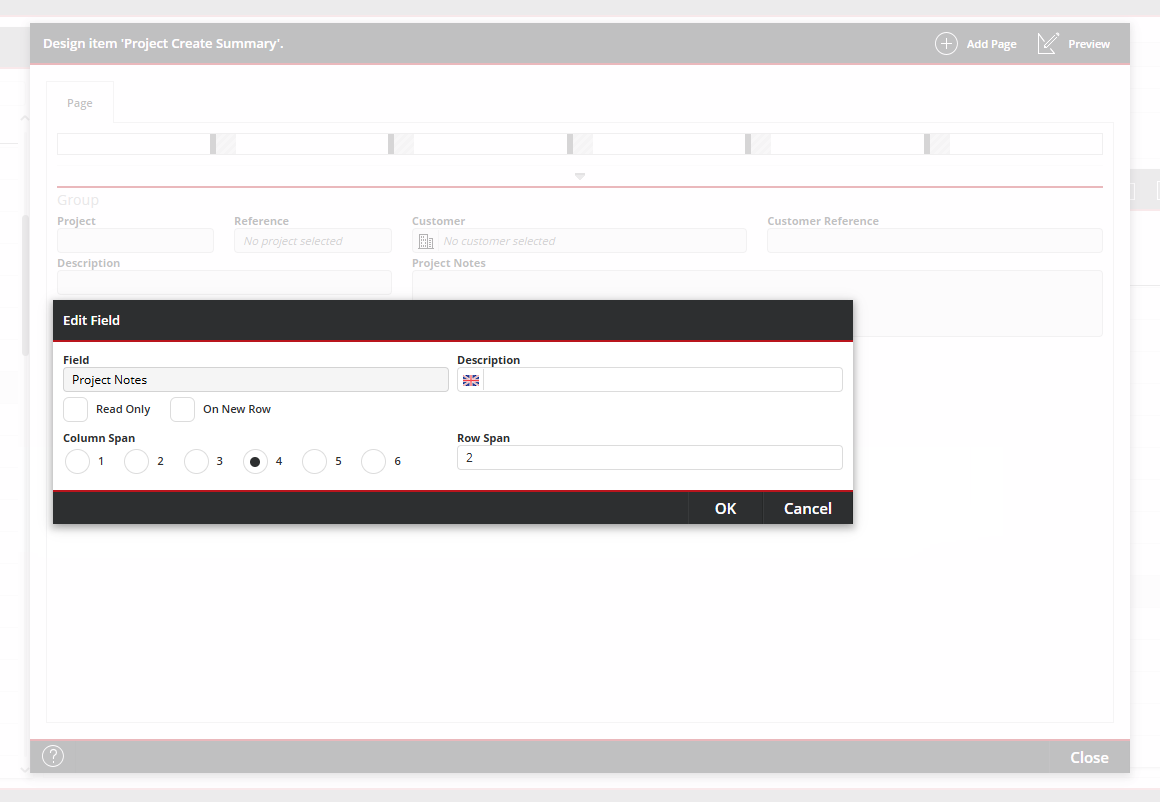
Controls to add things like Pages, Groups and Fields have be made more prominent and easier to access, whilst each also benefit from a clearer and more fluid interface, vastly improving this administrative process.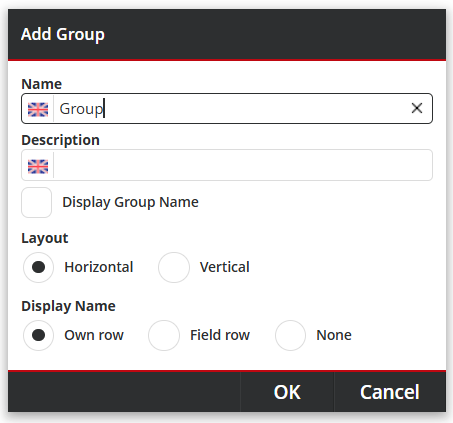
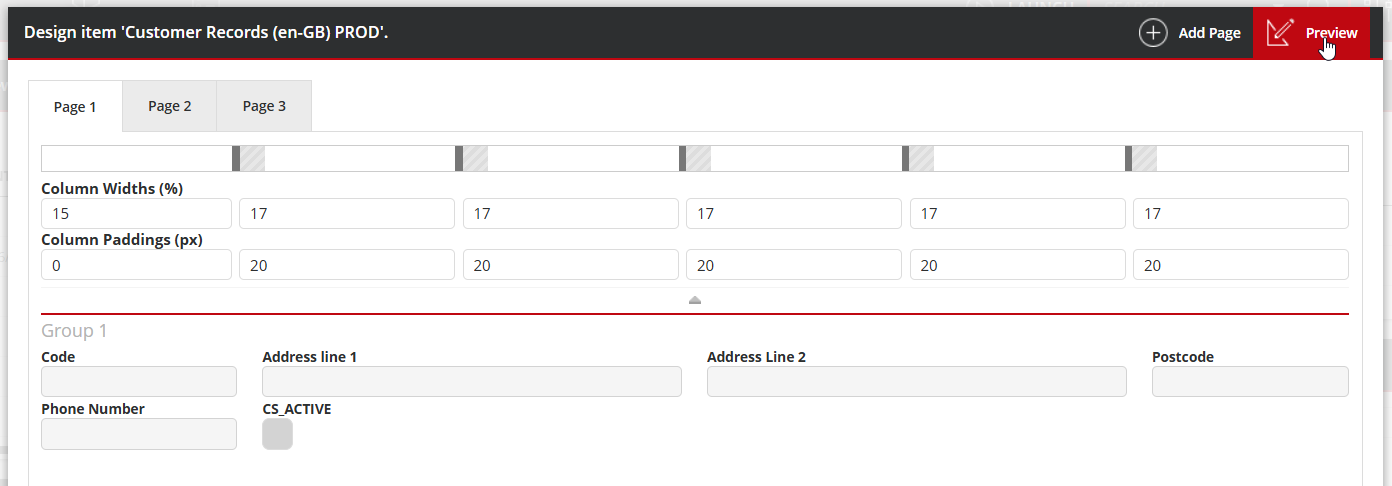
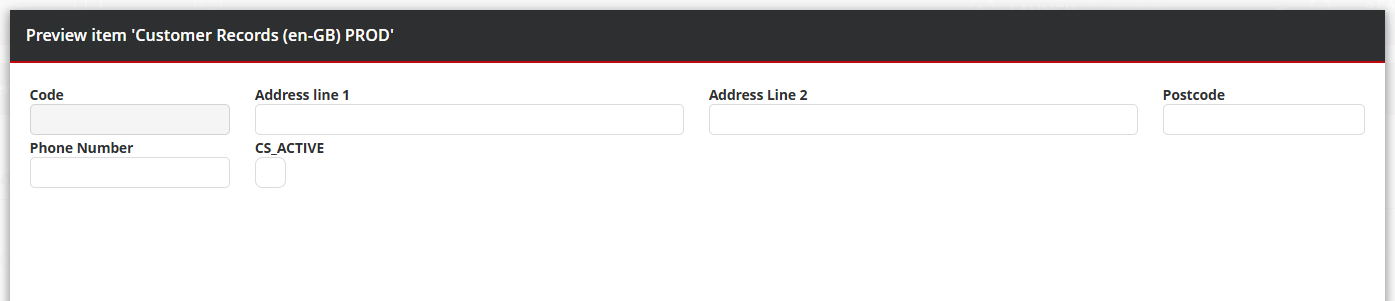
A live Preview mode is also available from the main action bar, providing a clean and interactive version of the current DBW page to speed up testing and refinement.
References:
WEB-305721, WEB-305317, WEB-307986, WEB-307944, WEB-307922, WEB-307919, WEB-307909, WEB-307876, WEB-307875, WEB-307873, WEB-307346, WEB-307345, WEB-307344, WEB-307343, WEB-301343, WEB-307879, WEB-305494, WEB-302526, WEB-55455
Text Searching Expression Functions
First introduced in WEBcnx 2024.1 Custom Field Expressions allow field values to be dynamically calculated. For WEBcnx 2025.1, we have extended the available functions to include a series of operations commonly found in applications such as Excel, for string comparison and extraction:
- LEN - Returns the length of the string
- LEFT - Returns one or more characters from the string, starting from the beginning
- RIGHT - Returns one or more characters from the string, starting from the end
- MID - Returns a specific number of characters from a specified starting position within the string
- SEARCH - Locates one text string within another and returns the starting position of the first string. (Case Insensitive)
- FIND - Locates one text string within another and returns the starting position of the first string. (Case Sensitive)
The applications are endless, but an example of the power and flexiblity of these functions could include performing alternate calculations based on whether the customer code contains a certain suffix.
References:
WEB-307802 / WEB-A-171
Custom Action Layer Status Filtering
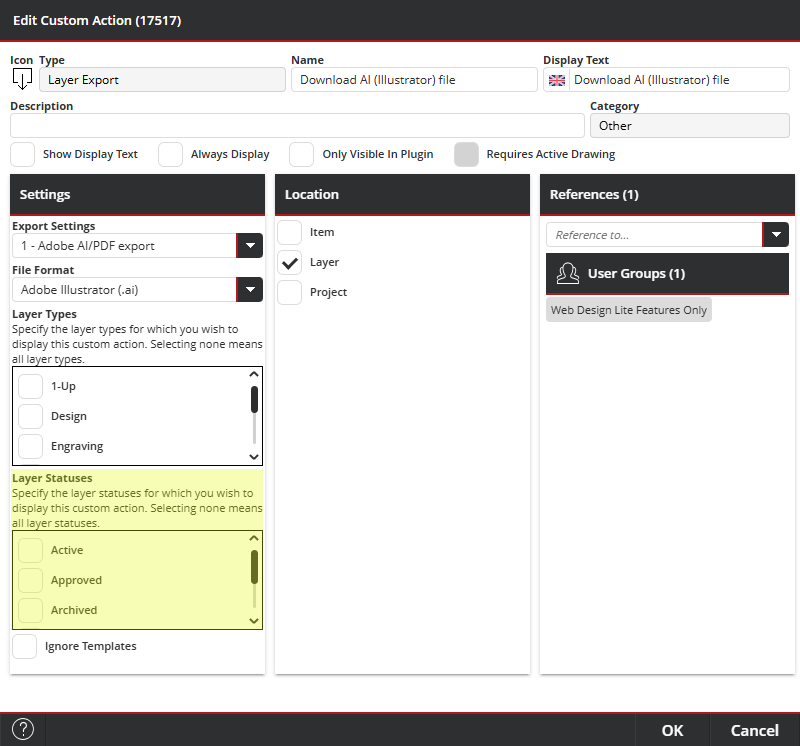
We’ve introduced a new Custom Action setting that allows configured layer statuses to control when a custom action is displayed. This builds on the existing settings used to show or hide custom actions based on Layer Types. Together, these options allow more precise control over which actions are available in each scenario, saving users the guesswork and helping to avoid mistakes.
The Layer Status filter settings are available for both 'Layer Export' and 'Layer Report Template' custom action types.
References: WEB-307980
Option to "Ignore Templates" in Create Item Custom Actions
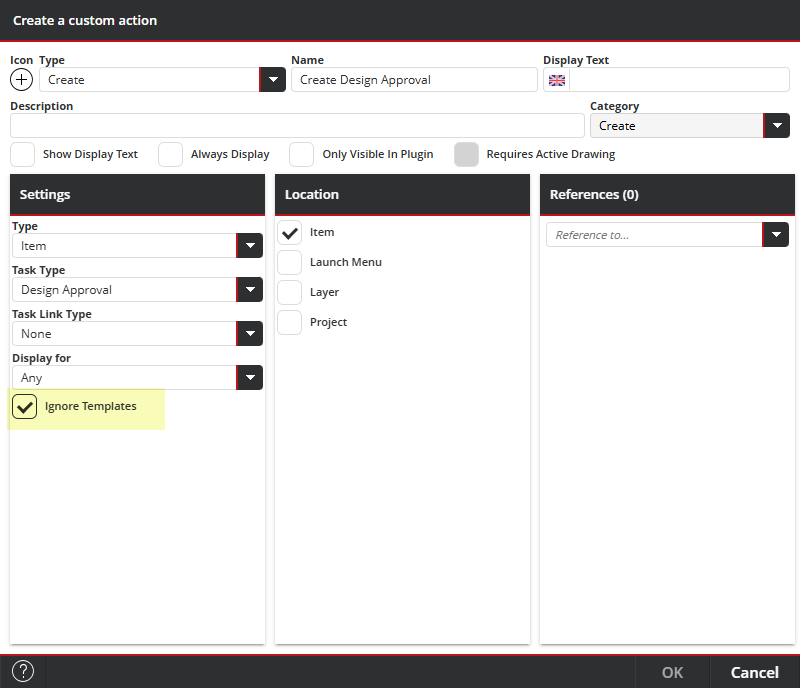
A new "Ignore Templates" setting has been introduced to the "Create" item type custom actions. When enabled, the task being created will not consider any task templates of any type (for example: Site, User Group, User, or Customer) and will instead respect the task default values.
This option is not enabled on upgrade. An administrator will need to enable it where required.
References: WEB-308035
Python-based Value Mapping Support
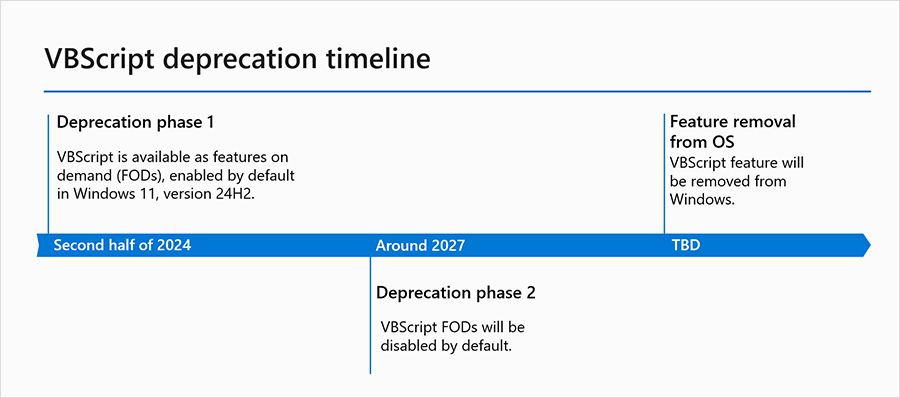
As with Impact and nServer, Python scripting support has now been introduced to WEBcnx ahead of Microsoft's plans to disable VBScript by default in Windows, and remove it later, due to growing security concerns. For more information, see Microsoft's 'VBScript deprecation: Timelines and next steps' article.
Initially, Python scripts can be added to COM-based Value Mappings by choosing from a new Language selection during Value Mapping creation. Future releases will continue to extend this approach to other areas currently using VBScript, such as script-based Workflow Activities.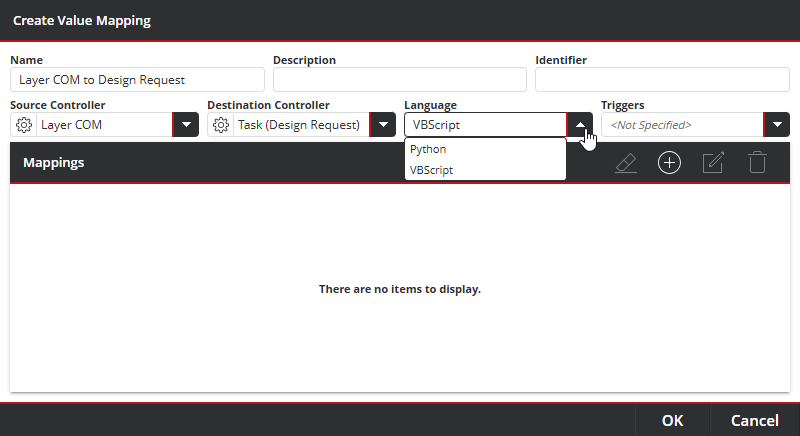
References: WEB-308039
Other Enhancements
- Users without the 'Delete discrete tasks' privilege can now delete their drafts - The 'Delete Tasks' privilege was previously required even to delete tasks that had not yet been published. Draft tasks can now be deleted by their creator regardless.
References: WEB-50357 - Clearer design association indicator on the Job/Task 'Design' tab - It is now possible to see at a glance whether a job or task has a project or layer association. We now show either 'Design (Project)', 'Design ([Layer Type])', or simply 'Design' where there is no association, as appropriate.
References: WEB-303187 - New 'Assignee is changed' notification option for 'Items requested by me' - The requestor of a task can now optionally be notified when their task is reassigned to someone else. An example notification email would be 'The assignee of the task requested by you has been changed from [A] to [B]'.
References: WEB-307647 - Impact user status enhancements - WEBcnx user management now takes account of the underlying status of the Impact USERS record to ensure both systems remain aligned. Previously, a user could appear as Active within WEBcnx but still be unable to connect if marked as Disabled within the linked Impact CAD database. User Synchronisation Scheduled Tasks will now keep the two systems aligned, together with any other user-level changes.
References: WEB-55158 - Move 'Languages' from Admin > Configuration to Admin > Localisation- Functionality is unchanged, but administrators should be aware of the new menu location.
References: WEB-307846
Reported Bug Fixes
The following issues have been addressed in this WEBcnx release:
WEBcnx 2025.1.1.0
WEB-55158 - WEBcnx to respect Impact user status
WEB-300698 - On Create Job or Task with Task COM Source not working
WEB-300787 - Choose default due date (time) format
WEB-301319 - Dragging an image within a browser causes the drop zone to persist
WEB-301350 - DBW Date field value does not persist
WEB-303175 - Revision comments display enumeration values instead of readable text
WEB-304934 - All Customers & Groups appear inactive if the Database List contains the CS_ACTIVE field
WEB-306088 - Users with limited Impact fields can seemingly search on missing fields
WEB-306657 - F5 has no effect after showing Lens in a dialog
WEB-306675 - Downloaded PDF designs have the title 'Impact COMServer Drawing'
WEB-307353 - Inconsistency while resizing the dialog
WEB-307363 - Layer preview checkbox captions untidy in German, French, and Spanish
WEB-307459 - Resizing a dialog enables actions which should not be enabled
WEB-307461 - NRE obliterating document
WEB-307482 - Exception synchronising customers
WEB-307541 - Task browser column selection not responding correctly
WEB-307597 - Export Custom Actions use latest, not selected, geometry
WEB-307604 - Clicking on the dashboard menu on an iPad keeps focus on it
WEB-307633 - Project revisions can have missing layers
WEB-307636 - Incorrect field hover menu position
WEB-307643 - Error when searching on root layers in design selector
WEB-307674 - Inconsistent spacing under summary DBW
WEB-307675 - Horizontal scrollbar under design view summary DBW
WEB-307687 - 'Create a Report Template of a Layer' dialog is not in the correct position in the design dialog
WEB-307688 - 'Edit a Custom Page' dialog is not in the correct position in the design dialog
WEB-307713 - CAD user selector calls 'CreateMyImpactUsers' upon initial display
WEB-307714 - Re-enable 'EnableProjectAndLayerFiltering'
WEB-307715 - Problems viewing tasks with an associated layer that is an excluded layer type
WEB-307718 - Project has no summary DBW when one is set but no general DBW is set
WEB-307727 - Unable to edit value mapping items
WEB-307737 - Incorrect WEBcnx version listed in nServer compatibility
WEB-307738 - Standards widget content overflowing
WEB-307741 - Exception ordering dashboard widgets
WEB-307751 - Design view tabs permanently disabled when viewing a project with no geometry
WEB-307754 - Incorrect sorting of DBWs & DBLs by reference
WEB-307756 - Field menu is displayed outside the site for maximum column span
WEB-307776 - After exiting a dialog with Escape, the OK button stays disabled
WEB-307777 - ReferenceError exception when deleting a user group
WEB-307778 - Error with Separator fields
WEB-307784 - Issues in resizing the Developer Tools dialog
WEB-307785 - Able to create a Task of an archived Task Type
WEB-307790 - Task Saved Searches fail to load in widget areas when CUSTOMER table relationships are undefined
WEB-307791 - Design Action Bar not visible in reduced view
WEB-307796 - Sorting Project Layers via Layer Type (L_EXTRA) causes an error loading data message
WEB-307797 - ORA-06550 when trying to delete visibility rules
WEB-307798 - Ad-hoc design layer tabs empty
WEB-307799 - Displaying Description instead of Name in Workflow diagram column
WEB-307811 - Viewing a document throws an exception
WEB-307812 - WEBcnx Scheduler Service Setup Wizard ended prematurely
WEB-307813 - JS error preventing Impact configuration loading
WEB-307823 - Developer Tools has Back and Forward buttons upon redisplay
WEB-307828 - Customer, Project, and Layer DBWs (general and summary) not appearing at all
WEB-307830 - Incorrect Scheduled Task start/finish time values
WEB-307851 - TaskSearchUnitTests failing
WEB-307859 - Synchronising dialog not closing after exception
WEB-307890 - ManageLDAPUserGroupsTask SchedulerService optimisation
WEB-307910 - Creating Layout causes NRE
WEB-307948 - Multiple instances of the same Scheduled Task running at once
WEB-307949 - No information provided during the update about database inconsistency error
WEB-307950 - 'Execute In Thread' to be enabled by default when adding Scheduled Tasks
WEB-307958 - Project and Layer (Locked by xxx xxx) indicating wrong user
WEB-307959 - 'AllowMultipleInstancesInThread' not respecting scheduled interval
WEB-307964 - Cannot save a date within the month of February in a date field
WEB-307966 - NRE detecting application name when nServer version is inappropriate
WEB-307967 - NRE signing into Support Sandbox as SUPPORT
WEB-307968 - Plugin needs Heat NuGet package adding
WEB-307972 - Caching prevents value mappings from working
WEB-307981 - Data Management menu will not open a custom table
WEB-307984 - Missing WCIMPACTCUSTOMERFORMATS records
WEB-307985 - Updating custom fields in Item Types does not update across site templates
WEB-307987 - Address Type forced when adding as a Custom Field
WEB-307991 - Developer Tools dialog gets built twice when reshown
WEB-307992 - Synchronise Customer Scheduled Task throws an exception on the server
WEB-308002 - Deleting a filter when viewing a chart does not correctly refresh the chart
WEB-308018 - Customer and CustomerGroup Browser Widgets dependent on wrong module
WEB-308029 - Project revisions not refreshed to include a change of DBW data
WEB-308033 - JS error when saving DBW field for unsaved drawing
WEB-308037 - Exception creating DBL for custom table
WEB-308042 - TaskAssigneeSelector pseudo items return incorrect results
WEB-308051 - Exception parsing date field after project import
WEB-308056 - Forgot Password (Password Recovery) feature from login screen broken
WEB-308059 - JS error saving Task Templates
WEB-308066 - WEBcnx Mobile not functioning correctly
WEB-308083 - Session timeout not applied to nServer licence
WEB-308095 - Memory leaks with document download
WEB-308108 - Timezone conversion fails for localised Impact COM TimeZoneId
WEB-308112 - Create Layout button is not responding
WEBcnx 2025.1.1.1
WEB-308147 - Arden.WEBcnx.Core.dll missing after install
WEBcnx 2025.1.1.2
WEB-308155 - WEBcnx Plugin fails to register within Impact due to a missing COM interop issue
WEBcnx 2025.1.1.3
WEB-308161 - Workflow Services connection leak
WEB-308068 - WorkflowScheduledTasks.svc SendTimeout no longer configurable
WEBcnx 2025.1.1.4
WEB-308170 - “Create a custom action” dialog opens without fields / freezes
Removed Features
- The Scheduler Task option 'Allow Multiple Instances In Thread' has been removed because it was not working as expected, and its intended use is no longer recommended or supported.
Impact / nServer Compatibility
Minimum Supported Version of Impact - Impact 2024 (v14.0.5.0) or Impact 2026 (v15.0.1.0)
Minimum Supported Version of nServer - nServer 2024 (v14.0.5.0) or nServer 2026 (v15.0.1.0)
Refer also to WEBcnx System Requirements.